Two ways to run Claude Desktop in your organization
A practical guide for deciding between paying per seat with Claude Team or routing inference through your own AWS account with Amazon Bedrock — with the decision trees and the actual configuration steps.
Claude Desktop has, at bottom, two operating modes. In the first, the app talks directly to Anthropic’s servers and your team signs in with a Claude Team account. In the second — called third-party inference — the app stops talking to Anthropic and sends every request to a provider you control, such as Amazon Bedrock. These are not layers you combine: it is a switch. This guide compares both paths and documents, with real screenshots, what the configuration looks like.
| Dimension | Claude Team | Amazon Bedrock |
|---|---|---|
| Billing model | Per seat / user, monthly | Pay-per-use (tokens), AWS invoice |
| Where the data lives | Anthropic infrastructure, United States | The AWS region you choose |
| Training on your data | No, by contract | No |
| Certifications | SOC 2 I/II, ISO 27001, ISO 42001, HIPAA-ready | The same + AWS’s compliance framework |
| Per-user audit | Workspace usage dashboard | CloudTrail, granular, by IAM identity |
| Encryption with your own keys | Not configurable | Yes, via KMS |
| Claude Design, memory, projects | Included | Does not apply — lives only on claude.ai |
| Initial setup | Invite users, done | Model access, IAM, quotas, MDM |
Team and Bedrock are not mutually exclusive at the organization level: you can move your development team (Claude Code) to Bedrock for cost and data control, while keeping some Team seats for anyone who uses Claude Design, memory, or projects.
Team or Bedrock?
flowchart TD
    A["Do you need to choose the exact<br/>region where the data lives,<br/>or encryption with your own keys?"] -->|Yes| B["Do you already have an active<br/>AWS account with committed spend?"]
    A -->|No| C["Does the team use Claude Design,<br/>memory across chats, or projects?"]

    B -->|Yes| D["Bedrock"]
    B -->|No, but I still need it| D

    C -->|Yes, actively| E["Team"]
    C -->|No, only Chat/Code/Cowork| F["Is usage very uneven<br/>across people?"]

    F -->|Yes, some use a lot,<br/>others almost none| D
    F -->|No, even usage<br/>all month| E
In practice, the strongest signal is usually the first one: if a customer, a regulator, or an internal policy requires knowing which country the data lives in, Bedrock answers that directly — Team, in its standard tier, does not.
Which Bedrock authentication method?
flowchart TD
    A["How many people<br/>are you migrating?"] -->|"1–3, I want a quick test"| B["Static API key<br/>(bearer token)"]
    A -->|"Broad rollout"| C["Do you need per-user<br/>identity in CloudTrail?"]

    C -->|Yes| D["Does your team already use<br/>the AWS CLI daily?"]
    C -->|No, a shared<br/>token is enough| B

    D -->|No| E["Interactive sign-in<br/>(SSO / IAM Identity Center)"]
    D -->|Yes| F["Cloud vendor profile<br/>(named profile + AWS CLI)"]

    A -->|"I already run my own<br/>LLM gateway/proxy"| G["Helper script<br/>or Gateway mode"]
| What you see in the app | What it actually is |
|---|---|
Static API key | Bearer token — a Bedrock API key pasted in directly |
Interactive sign-in | SSO via IAM Identity Center, identity per user |
Cloud vendor profile | Named AWS CLI profile (~/.aws/config) |
Helper script | An executable that prints the token in real time |
What the configuration looks like, step by step
These are real screenshots of the flow inside Claude Desktop on macOS.
1. Enable developer mode
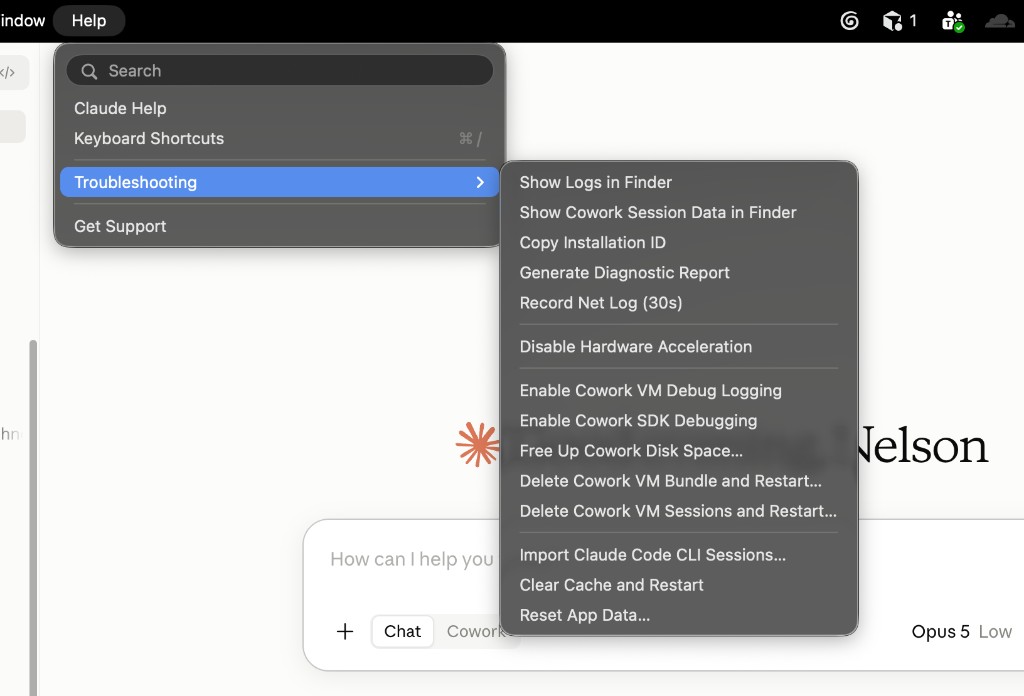
The third-party inference option does not appear by default. It is turned on from Help → Troubleshooting → Enable Developer Mode. After you confirm, the app restarts and a new Developer menu appears in the menu bar.
2. Choose Bedrock as the provider
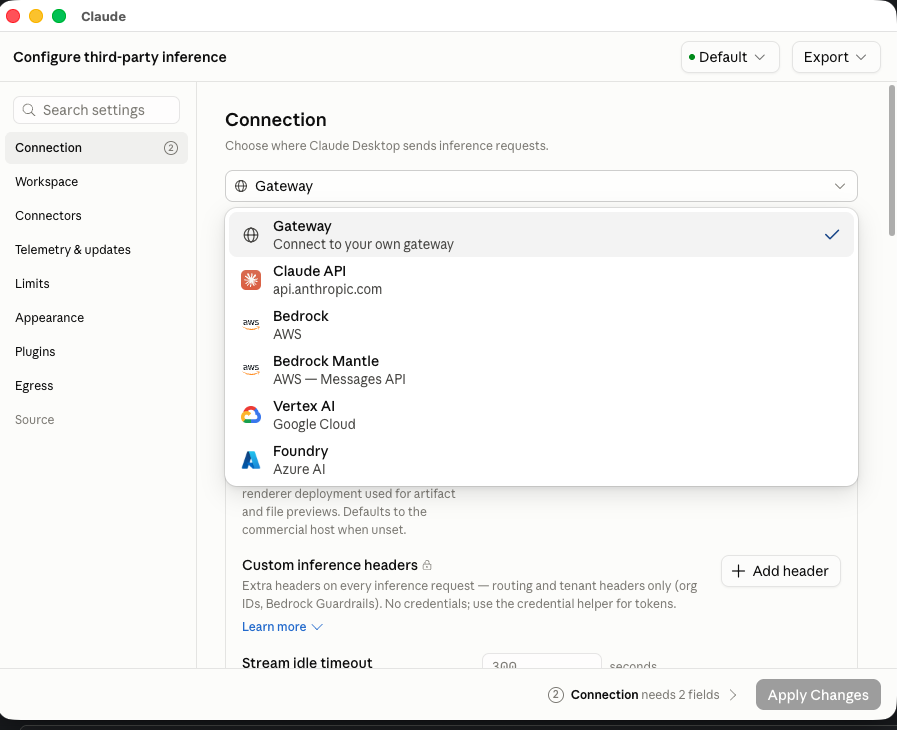
In Developer → Configure Third-Party Inference, the Connection section shows a dropdown with every supported provider: your own Gateway, Claude API, Bedrock, Bedrock Mantle, Vertex AI, and Foundry.
3. Fill in region and credentials
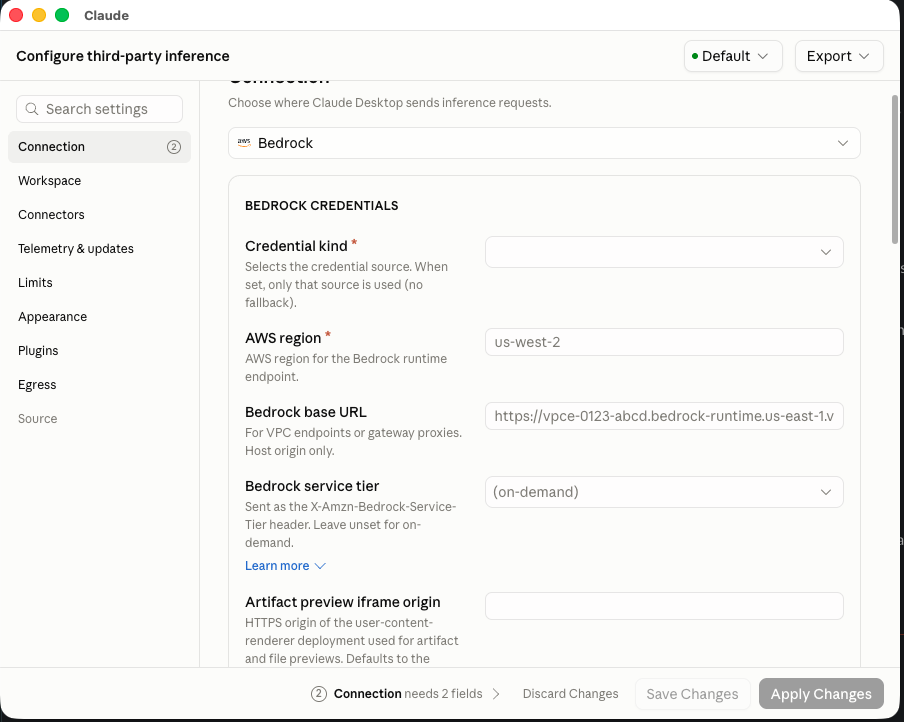
When you choose Bedrock, the app asks for the AWS region and the credential kind. Both fields are required — the app tracks how many are still missing before you can apply changes.
4. Choose the credential kind
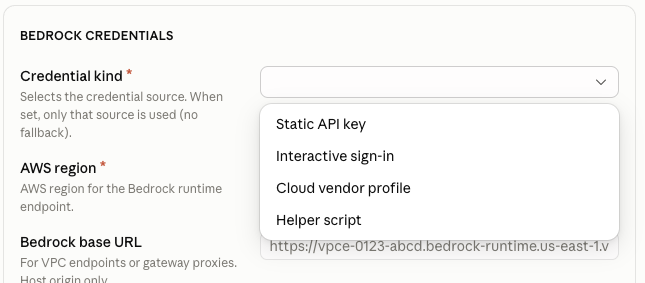
The Credential kind field expands the four options described above. For a first test, Static API key is the fastest to validate.
bedrock:InvokeModel
bedrock:InvokeModelWithResponseStream
bedrock:CallWithBearerToken
Minimum IAM permissions depending on the authentication method you choose.
What happens with personal data
In both models, your organization is the one that controls what gets uploaded and for what purpose — Anthropic (or AWS, in the Bedrock case) acts as a processor under a data processing agreement (DPA). Neither Team nor Bedrock uses what your team uploads to train models.
- With Team: the data is processed on Anthropic infrastructure in the United States, with configurable retention (30 days by default) and no option to choose the region.
- With Bedrock: the data is processed in the AWS region you choose, with the option to encrypt it with your own keys and to audit every request per user via CloudTrail.
This is not legal advice. If your organization processes personal data under a specific data-protection law, check with your legal team whether you need a signed DPA, additional privacy notices, or Bedrock because of a residency requirement — not only because of a technical preference.
Migration checklist, if you move the whole team
- Validate on a single machine. Configure Bedrock as an admin, confirm that traffic is reaching AWS (invoice or CloudTrail) before you touch the rest of the team.
- Enable model access in
Model accessin the Bedrock console, in the same region you are going to use. - Pick one authentication method per group. Each managed configuration assumes a single AWS account and role — groups with different permissions need separate profiles.
- Export the configuration from the
Exportbutton — it generates a.mobileconfig(Mac) or a.reg(Windows). - Open the network egress that the same window lists for you, before you roll this out to anyone.
- Distribute via MDM (Jamf, Intune, Group Policy) and confirm that every machine restarts the app — the configuration is only read at launch.
- Adjust the Team seats you no longer need, or keep them for anyone who uses Claude Design, memory, or projects.
Frequently asked questions
If I turn on Bedrock, do I have to pay for Team and Bedrock at the same time?
Not as a technical requirement. Turning on third-party inference completely changes where Claude Desktop sends traffic — it stops talking to Anthropic and talks directly to Bedrock; it does not split requests between the two. But your Team subscription does not cancel itself: if you move the whole team, reduce or cancel the seats you no longer use.
Can I use SSO (Interactive sign-in) without MDM?
Yes. Each person can configure it by hand from Developer → Configure Third-Party Inference on their own machine. MDM is only needed to automate distribution to many machines.
What do you actually gain with Bedrock?
Pay-per-use billing, a consolidated AWS invoice, control over the data’s region, per-user audit via CloudTrail, and permissions managed with your own IAM. In exchange, you lose the features that only exist on your Anthropic account (memory, projects, Claude Design), and the initial setup is longer.
What about Claude Code?
It is configured separately, via /setup-bedrock or environment variables (CLAUDE_CODE_USE_BEDROCK=1, AWS_REGION, AWS_BEARER_TOKEN_BEDROCK). It does not inherit Claude Desktop’s configuration.
What about Claude Design?
It does not apply — it lives inside claude.ai, tied to your Team/Enterprise subscription, not to a local app that can point at Bedrock.
Am I taking a compliance risk with Team?
Team already comes with SOC 2 I/II, ISO 27001, ISO 42001, and a HIPAA-ready config, and it does not train on your data by contract. The real limit is that you cannot choose the processing region or bring your own encryption keys — that is where Bedrock or Enterprise come in.
Does an Excel file with names and phone numbers process normally on Team?
Yes, it processes normally — it does not trigger any block. The limit appears only if the task itself is malicious, not because the file contains personal data.
Are those data used for training or as examples in other conversations?
No. They are used only to generate the response in the moment (inference), they are not used to train future models, they are not shared with other companies, and they do not persist beyond the retention period configured by the admin (30 days by default).
LinkedIn nelson.zepeda@simov.io SIMOV LABS
Found an error? Suggest a correction